Showing posts with label database. Show all posts

Monday, December 20, 2010

Exchange 2010 Two Nodes Enter – ONE LIVES.

Starting Active: MBX1

Starting Passive: MBX2

Starting Primary Active Manager: MBX1

The scenario is one where there are two DAG nodes (yes I know more is ideal, but that’s life) that must be brought down, and the active node has an issue from which it cannot recover. This can apply to site-wide power outages or other disaster scenarios as well.

The issues that can arise in this scenario seem to vary from my testing.

Test lab steps:

1. Shutdown both nodes.

2. Power on MBX2. Leave MBX1 offline.

3. Databases' status comes up as Service Down (as expected) for MBX1, and Disconnected/Resyncing for MBX2.

Issues and solutions that may arise:

1. Cluster won’t start on MBX2.

a. On MBX2, open a CMD prompt and run: ‘net start clussvc /fq’

b. This forces the cluster service up without concern for quorum.

2. EventID: 3154 MSExchangeRepl

Active Manager failed to mount database DB1 on server EXCHANGE. Error: An Active Manager operation failed with a transient error. Please retry the operation. Error: A transient error occurred during discovery of the database availability group topology. Error: Database action failed with transient error. Error: A transient error occurred during a database operation. Error: MapiExceptionNetworkError: Unable to make admin interface connection to server

a. Verify that MBX2 is the Primary Active Manager (PAM).

i. Generally after a failure of this type, the former Active Manager (if it was MBX1) will be offline, or unassigned.

b. The owner of the cluster core service group (“Cluster Group”) is the PAM. If this isn’t true, then we need to force the fact.

c. cluster . group "Cluster Group" /move:MBX2

3. Check PAM via ‘Get-DatabaseAvailabilityGroup -Status | fl name,primaryactivemanager’

a. Validate MBX2 as PAM.

4. EventID: 3170 MSExchangeRepl

Attempt to move active database ‘DB1’ from MBX2 to MBX1 failed. Error: An Active Manager operation failed. Error: The database action failed. Error: An error occurred while trying to validate the specified database copy for possible activation. Error: Database copy ‘DB1’ on server ‘MBX1’ has content index catalog files in the following state: 'Failed'.

a. Validate: Get-MailboxDatabaseCopyStatus | fl name, contentindexstate

b. Content index displays as ‘Failed.’

c. Move-ActiveMailboxDatabase - identity DB1 -ActivateOnServer MBX2 -SkipLagChecks -MountDialOverride BestEffort – SkipClientExperienceChecks

d. Process is repeated on all other databases. SkipClientExperienceChecks will ignore the bad content index.

5. All databases are mounted on MBX2, and MBX1 is still down.

6. Booted up MBX1 post-disaster and resume.

a. Replication comes up as ‘Healthy’ after a few minutes.

b. A reseed may be necessary depending on the size and circumstances, but it was never required for me.

Monday, January 11, 2010

Script to pull database stats and e-mail results

With some help from a coworker (irundis.com), I got this script put together for pulling database stats, and then e-mailing the results to an e-mail recipient. The idea is to just attach this to a scheduled task and let it run. It is a good thing I got help or I'm positive it wouldn't be quite this pretty.

Scheduled Task:

Program/Task:

C:\windows\system32\windowspowershell\v1.0\powershell.exe

Arguments:

-PSConsoleFile "C:\Program Files\Microsoft\Exchange Server\bin\exshell.psc1" -noexit -command ". C:\DBStats.ps1

-------------------------------------------------------------
Script (be careful about returns if you copy/paste)
-------------------------------------------------------------

function Get-MXDBData() {
PROCESS {

$identity = $_.Name
$FullID = $_.identity
$FilePath = $_.EdbFilePath.PathName
$SizeMB = [long]([long]((Get-ChildItem $FilePath).length) / 1048576)
$SizeGB = [long]($SizeMB / 1024)
$MBXCount = (Get-Mailbox -database $FullID).count

#Create the new custom object and add new members to the object
$obj = New-Object PSObject
$obj | Add-Member NoteProperty Database $identity
$obj | Add-Member NoteProperty "Size in GB" $SizeGB
$obj | Add-Member NoteProperty "Size in MB" $SizeMB
$obj | Add-Member NoteProperty "Mailbox Count" $MBXCount

#Output the object to gain access to all of its properties for later in the pipeline.
Write-Output $obj
}
}

Get-MailboxDatabase -Server SERVER | Get-MXDBData | export-csv -path c:\DBStats.csv -NoTypeInformation

################
# SMTP Mail Alert
################

$file = "c:\DBStats.csv"

#Create new .NET object and assign to variable
$mail = New-Object System.Net.Mail.MailMessage

#Sender Address
$mail.From = "sender@domain.com";

#Recipient Address
$mail.To.Add("recipient@domain.com");

#Message Subject
$mail.Subject = "Database Statistics Report";

#Message Body
$mail.Body = "Please see attached CSV for database size and mailbox count.";

#Connect to your Hub Transport (FQDN or NLB alias)
$smtp = New-Object System.Net.Mail.SmtpClient("fqdn.domain.com");

#Attach CSV
$attachment = new-object Net.Mail.Attachment($file)
$mail.Attachments.Add($attachment)

#Uncomment if no anonymous relay (best practice to have separate receive connector)
# $smtp.Credentials = New-Object System.Net.NetworkCredential("username", "passwd");

#Send Email
$smtp.Send($mail);

$attachment.Dispose()


Example of output before CSV:


Wednesday, November 5, 2008

ESEUTIL - Maintenance and Recovery

ESEUTIL can provide a number of database functions including defrags and repairs.  I will be quickly covering a few of the more important tasks/scenarios.

ESEUTIL is in "C:\Program Files\Microsoft\Exchange Server\Bin" by default, and the rest of the commands I show run from this directory.

OFFLINE DEFRAG
-------------------------------
Offline defrags, under normal circumstances, do not need to be run.  This is because online maintenance typically does a good job of keeping things in order.  It may not get everything cleaned up, but what little bit it doesn't typically gets grown into anyways.  The need comes in when a chunk of users gets deleted, or if you have to add a very large quantity of users.

Steps:

Determine White Space

   a. eseutil /ms  c:\exchange\data\sg1\mb1.edb 

**Must be run on an database that is not mounted**

b. Check event 1221 in the event log.


Once you determine that you have enough white space to warrant an offline defrag..

Run the Defrag

eseutil.exe /d c:\EXCHSRVR\mdbdata\SG1MS1.edb 


DATABASE IN AN INCONSISTENT STATE
------------------------------------------------------------------------

Steps:

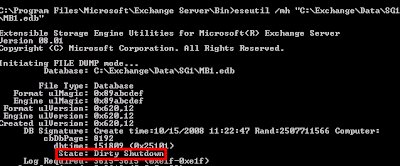
  a. Check current state: 

 eseutil.exe /mh C:\exchange\data\SG1\MB1.edb 
Notice how the database is in a Dirty Shutdown state?

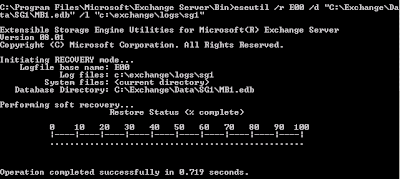
b. Typically to recover from this, we need only run a variation of the following command:
  
  eseutil /r E00 /d "C:\Exchange\Data\SG1\MB1.edb" /l "c:\exchange\logs\sg1" 

As shown below, this did the trick.


 c.  If this didn't work, we may have need to fall back on a full repair.  This is typically only used if log files are missing, the database is corrupt, or some other catastrophic event has occurred.  It is executed by instead using the /P switch, and basically it tosses any pages that it does not perceive as fixable.  According to Microsoft, you should follow this up with an isinteg.exe run, but I've been told by enough people that it is bad mojo to keep me shying away from it unless I have to.

Other ESEUTIL functions are more informational such as /G /M and /K.

You can reference the official Microsoft site for eseutil here.

Sunday, September 21, 2008

Tricking Exchange - A Different Database Move

The issue arose of moving a database to a new location.  Now there are built in commands for this:

FOR LOGS:
Move-StorageGroupPath -identity SERVER\StorageGroup -LogFolderPath X:\PathToLogFiles -SystemFolderPath X:\SystemFolderPath

FOR DATABASES:
Move-DatabasePath  Server\StorageGroup\MailboxStore -EDBFilePath X:\PathToDatabase

The problem was that we wanted to specifically use eseutil to move the databases.  We used eseutil to push a good copy over, however, we couldn't repoint the database without Exchange trying to copy it over.  I believe you can repoint the registry, but we opted to just trick Exchange in a manner of speaking.  Due to size constraints, we created a new empty database, ran the above command to move it, then deleted the new database and replaced it with the eseutil copied one.  This mounted up and worked great.

An alternative method to the normal methods of moving it over if you have odd circumstances to work under.