Showing posts with label sherpa. Show all posts

Friday, March 20, 2009

ArchiveXchange - Archive Attender 3.5 released!

The Azaleos offering for ArchiveXchange is making strides!   Thanks to our friends at Sherpa Software hearing our input, as well as our customers' input, we now have access to new and exciting features to work with.

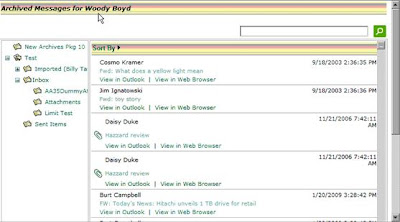
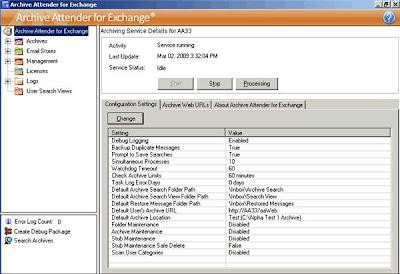
The console has been overhauled:


An auto aging stub feature has been added:


All stub activity can now be acted upon based on criteria, and best of all for my practical purposes, archive auto creations!   Auto archive creations based on thresholds are essential for keeping maintenance windows small, especially when journaling.  It allows admins to essentially have 'save points' where data ceases to change, and thus, remains more stable in the isolated environment.  Maintenance need only be run against the deltas!

Another benefit to upgrading is the new web-based search features.  As the product continues to evolve toward a hybrid product, more options open up to users as to if they want full reliance on stubs, searching, or both.


The listed upgrades combined with other admin and user bound benefits make this a great release, and a product worth watching when comparing to other technologies.

Friday, October 3, 2008

Scripts to Create Archive Attender Service Account

Save this one as usercreation.vbs or something along those lines:

'Creates ArchiveUser in the Archive OU and assigns Password


Option Explicit
Dim objRootLDAP, objContainer, objUser, objShell, objNetwork, objLocalGroup, objDomainGroup, objWshNet
Dim strUser, strName, strContainer, strPassword, strDescription, strDomain, strLogon, strLastName, strDisplayName, strComputer

'Variables
Set objWshNet = CreateObject("WScript.Network")
strUser = "ArchiveUser"
strName = "Archive"
strContainer = "OU=Archive ,"
strPassword = "Password"
strDescription = "Archive Attender Service Account"
strLogon = "ArchiveUser"
'Automatically pulls Domain
strDomain = objWshNet.UserDomain
strLastName = "Archive"
strDisplayName ="ArchiveUser"

'Gets you bound to AD
Set objRootLDAP = GetObject("LDAP://rootDSE")
Set objContainer = GetObject("LDAP://" & strContainer & _
objRootLDAP.Get("defaultNamingContext"))

' Performs user creation
Set objUser = objContainer.Create("User", "cn=" & strUser)
objUser.Put "sAMAccountName", strUser '25
objUser.Put "givenName", strName
objUser.put "sn",strLastName
objUser.put "UserPrincipalName",lcase(strLogon)&"@"&strDomain
objUser.put "DisplayName",strDisplayName
objUser.put "name",strName
objUser.put "description",strDescription
objUser.Setinfo

' Do not force a change of password on first login
objUser.SetPassword strPassword
objUser.Put "pwdLastSet", CLng(-1)
objUser.SetInfo

' Enable the user account
objUser.Put "userAccountControl", 512
objUser.Put "userAccountControl", &H10000
objUser.SetInfo

WScript.Quit


Now that we have a user, lets give themlocal admin rights.  You can name this localadmin.vbs or something like that:

Set objWshNet = CreateObject("WScript.Network")

strDomain = objWshNet.UserDomain
strComputer = objWshNet.ComputerName
Set objGroup = GetObject("WinNT://" & strComputer & "/Administrators,group")

strUser = "ArchiveUser"
Set objUser = GetObject("WinNT://" & strDomain & "/" & strUser & ",user")

'Add user to group

If Not objGroup.IsMember(objUser.ADsPath) Then
objGroup.Add(objUser.ADsPath)
End If


We now have a user with local admin rights.   What about Exchange rights though?  


For Exchange 2007:

Create this script and name is ExchangeRights.ps1:

Add-ExchangeAdministrator -Identity ArchiveUser -role 'orgadmin'
$server = Get-MailboxServer
Add-ADPermission -Identity $server.Identity -User "ArchiveUser" -ExtendedRights ("Send As", "Receive As")
Get-MailboxDatabase | Add-ADPermission -user ArchiveUser -AccessRights GenericAll -ExtendedRights ("Send As", "Receive As", "MS-EXCH-STORE-ADMIN")

For Exchange 2003:

First enable the security tab to be displayed in ESM via this registry key:

HKEY_CURRENT_USER\Software\Microsoft\Exchange\ExAdmin 

ADD--
Value Name: ShowSecurityPage
Data Type: REG_DWORD
Value: 1  


Once that is done, you need only do to the org level in ESM and add full rights for your new account (be sure to include Send As / Receive As rights).  If it isn't working, be sure that you didn't inadvertantly add the user to Domain Admins.  Domain Admins was set to have an explicit deny set for send/receive as as part of Microsoft's security push.

If you are not wanting to set permissions at the org level, you can set the permission levels down further so long as they apply to all the users/databases that you wish to process against.
Thursday, September 11, 2008

Blogs

If you guys haven't checked out the blogs I have posted on the right hand side for JeremyinMotion and SherpaSoftware, you should do so.  Sherpa has a product line that Azaleos works with, and Jeremy Phillips is a coworker/raconteur.

Friday, August 29, 2008

Troubleshooting Archive Attender with ixSearch

When a customer lets me know that a member of their user base is unable to retrieve a message via the link in the stub due to the original message not being found, there are a few things to check.

The first thing to check is that the message is actually in the archive location. To do this, first we must determine the GUID associated with the user in question. Open Archive Attender, Click Groups, and navigate to your user.

Right click the user and click 'Edit User Settings..'


You will then want to browse the windows file system and navigate to the user's archive, and then the folder that the message exists in the user's mailbox. Please note that if the stub was moved after the archiving action took place, then you will have to check the folder that it was originally archived from.


If we can verify that the message is where it is supposed to be, then we need to check the map index to verify that Archive Attender knows where to find it when you click the link in the stub. We can accomplish this with the ixSearch tool.

For Index Path, we choose the _Map folder under the Archive to which the user belongs. For the query, we enter the guid of the message in question. The guid can be taken from the link in the stub. We then click the 'Search' button. If nothing pops up, that means that the map index cannot find this message in the specified archive's map index.


If it does in fact find an entry, as shown above, then we double click the result. It will pop up the following window in which we can see the location that Archive Attender believes the message to reside.


In the case above, it is in the correct place. If this was incorrect from the real location, or it didn't exist in the map index at all, we'd have to run a task to rebuild the map index. Right click the archive in AACONSOLE.exe, click 'Archive Tasks', and then click 'Rebuild Map Index.'


This will reestablish the link between stub, index, and archived message. I have seen two cases where the folder structure somehow got an extra space in one of the names, and the map index did not pick up on this. The fix is to be careful about reading the ixsearch.exe output, and verify that it is exact. If there is a space character issue, you can browse the folder structure and remove the space from the folder name manually to fix the indexing issue.