Showing posts with label defrag. Show all posts

Wednesday, November 5, 2008

ESEUTIL - Maintenance and Recovery

ESEUTIL can provide a number of database functions including defrags and repairs.  I will be quickly covering a few of the more important tasks/scenarios.

ESEUTIL is in "C:\Program Files\Microsoft\Exchange Server\Bin" by default, and the rest of the commands I show run from this directory.

OFFLINE DEFRAG
-------------------------------
Offline defrags, under normal circumstances, do not need to be run.  This is because online maintenance typically does a good job of keeping things in order.  It may not get everything cleaned up, but what little bit it doesn't typically gets grown into anyways.  The need comes in when a chunk of users gets deleted, or if you have to add a very large quantity of users.

Steps:

Determine White Space

   a. eseutil /ms  c:\exchange\data\sg1\mb1.edb 

**Must be run on an database that is not mounted**

b. Check event 1221 in the event log.


Once you determine that you have enough white space to warrant an offline defrag..

Run the Defrag

eseutil.exe /d c:\EXCHSRVR\mdbdata\SG1MS1.edb 


DATABASE IN AN INCONSISTENT STATE
------------------------------------------------------------------------

Steps:

  a. Check current state: 

 eseutil.exe /mh C:\exchange\data\SG1\MB1.edb 
Notice how the database is in a Dirty Shutdown state?
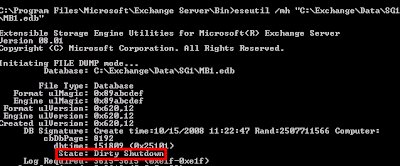
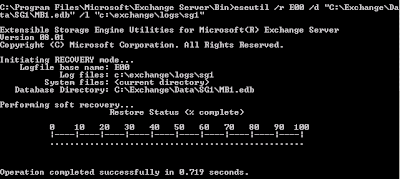
b. Typically to recover from this, we need only run a variation of the following command:
  
  eseutil /r E00 /d "C:\Exchange\Data\SG1\MB1.edb" /l "c:\exchange\logs\sg1" 

As shown below, this did the trick.

 c.  If this didn't work, we may have need to fall back on a full repair.  This is typically only used if log files are missing, the database is corrupt, or some other catastrophic event has occurred.  It is executed by instead using the /P switch, and basically it tosses any pages that it does not perceive as fixable.  According to Microsoft, you should follow this up with an isinteg.exe run, but I've been told by enough people that it is bad mojo to keep me shying away from it unless I have to.

Other ESEUTIL functions are more informational such as /G /M and /K.

You can reference the official Microsoft site for eseutil here.

Tuesday, October 7, 2008

Mail.que Issues - White Space, Defrags, etc

What is the Mail.que?

The Mail.Que is an ese database that acts as the transport queue on your Exchange 2007 server - Hub Transport or Edge Transport roles only.

Why would I need to run maintenance/fix issues with mail.que?

Issues can arise with the mail.que file getting very large, and fragmented.  This can cause problems ranging from performance issues, to a full blown outage on an Exchange environment.  This scenario can come about from multiple avenues, but a couple of seemingly more common culprits can be email blasts (especially with a large attachment on it), or if the database has not been maintained.  

If my mail.que file gets large/fragmented, how do we rein it in?

Prerequisites:

1.  You must be at least an Exchange Server Administrator. (Local admin on the Edge Transport server).

2.  Per Microsoft, the following rights must exist to the mail.que:

Network Service: Full Control
System: Full Control
Administrators: Full Control

3.  If you are planning to restore the mail.que file to another transport server, that server must have the same roles as the server you are taking it from.  Mail delivery issues can arise if this is not the case, or if that server is located in a different AD forest (in which case you may have to resubmit through the categorizer).


Now that the prereqs are out of the way, we can begin to repair the database.


Step 1:  Locate the database.  

Unless you've changed the location, the database should reside at "C:\Program Files\Microsoft\Exchange Server\TransportRoles\data\Queue" on a Hub Transport server. 

You can find the location on an Edge Server in the EdgeTransport.exe.config file under C:\Program Files\Microsoft\Exchange Server\Bin.  Look for the 'QueueDatabasePath' and 'QueueDatabaseLoggingPath' values.


Step 2: Move the database out.

Stop the MSExchangeTransport service then move the following files to a temporary location: Mail.que, Trn.chk, Temp.edb, Trn.log, Trnnnn.log, Trnres00001.jrs, Trnres00002.jrs, and Trntmp.log. 

Upon restarting the MSExchangeTransport service, a new mail.que will be created so mail and continue to flow.  


Step 3: Recovering/Maintaining the Database

Open a command prompt and navigate to the directory where you moved the database to.

eseutil.exe /r Trn /d

This command will run a recovery against the database.  You could run this from another location, but you'd have to specify where the database exists after /d.  Either way works.

eseutil /d mail.que

This command will defrag the database and rid it of any white space that has ballooned it up, thus increasing performance and/or resurrecting it.


Step 4:  Prepare for reinsertion of the old mail.que.

The first thing we need to do is to pause the queues via:

Net Pause MSExchangeTransport

This will stop the flow into queues and delivery all current mail.

Just to make sure the queues are clear before we continue, lets have a look.

VIA Get-Queue in the Exchange Management Shell:


VIA Exchange Management Console:


It would probably be a good idea to resubmit your unreachable queues, though this is optional. 

If you want to, MS provides us the following command to do so:

Retry-Queue -Identity "Unreachable" -Resubmit $True

You can recover your poison queues too, though I personally don't usually bother.


Step 5:  Reinjection.

Now all we have to do is reinsert the old mail.que.  Stop the MSExchangeTransport service, copy the old files back in, and Start MSExchangeTransport.  

This is the part where I stray from the MS plan.  I would recommend to go back to Step 4 and let the queues drain out again.  Once they are empty, stop the MSExchangeTransport service, delete the mail.que database, and restart the MSExchangeTransport service letting the mail.que database recreate.  The reason I say to do this is that I know a colleague of mine had an issue using the original mail.que file.  It suffered corruption, and would balloon back out to upwards of 7 gigs with no real data in it to speak of!  This type of behavior could bring the Exchange system to its knees.  I'd just as soon start with a fresh slate.